
Setup
Zoom should already be set up on your Samsara computer, ready to go!
If you don't believe you have the right access to Zoom Phone yet, and/or need a number assigned, please visit #help-biztech-gtms. Sales leadership has determined that a user may have up to three different ZoomPhone numbers assigned to them.
Zoom Phone Spam numbers
I've received feedback from clients that my outgoing calls are being identified as "potential spam." How can I resolve this?
Please gather detailed information from at least three separate instances where your outgoing calls were marked as potential spam, ensuring these calls are to different contacts.
For each call, BizTech will need the following details to help troubleshoot:
- The phone number you used for making the call
- The recipient's number
- Date of the call
- Time of the call, including your timezone
Once you have collected this information from at least three different calls, please proceed to #help-biztech, submit a ticket, and include these details for further assistance.
Call recording
Are my Zoom Phone calls automatically recorded?
There are two factors that will determine the behavior of automatic call recording in Zoom Phone:
- The state/location in which you physically live (as posted in Workday).
- The states/locations where your accounts/contacts are physically located.
What if I live in a two-party consent / pre-consent location?
If you live in a two-party consent / pre-consent location, your automatic call recording will be disabled in Zoom Phone. Call recording can still be started manually.
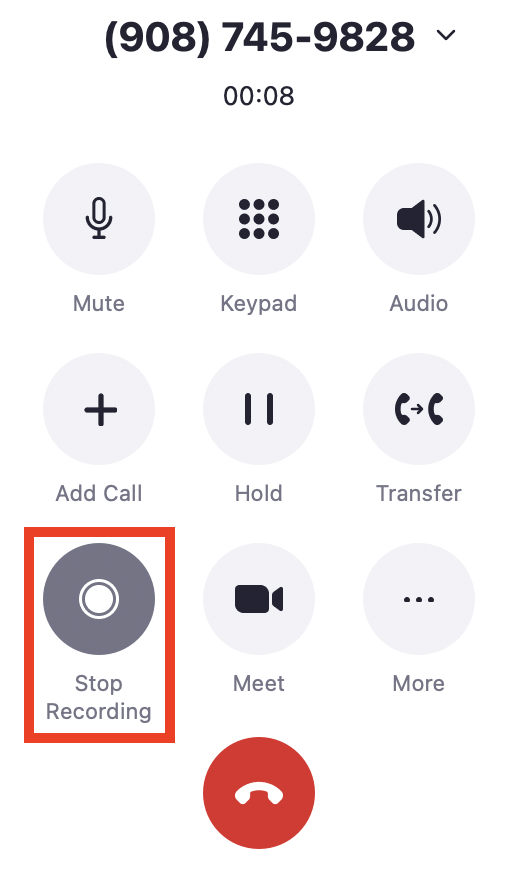
If you want to record an inbound or outbound call, click the record button on the Zoom app (see image below).
(Two-party consent / pre-consent locations are highlighted in RED on the map above - Canada; USA: California, Connecticut, Delaware, Florida, Illinois, Maryland, Massachusetts, Michigan, Montana, Nevada, New Hampshire, Oregon, Pennsylvania, Vermont, and Washington; Mexico; United Kingdom; and EU countries.)
What if I live in a one-party consent state?
If you live in a one-party consent state, Zoom Phone WILL automatically record your inbound calls, outbound calls, and transfers between AEs and ADRs - regardless of the telephone consent laws of the location into which you are calling.
(the Green states in the map above - USA: Alabama, Alaska, Arizona, Arkansas, Colorado, District of Columbia, Georgia, Hawaii, Idaho, Indiana, Iowa, Kansas, Kentucky, Louisiana, Maine, Michigan, Minnesota, Mississippi, Missouri, Nebraska, New Jersey, New Mexico, New York, North Carolina, North Dakota, Ohio, Oklahoma, Rhode Island, South Carolina, South Dakota, Tennessee, Texas, Utah, Virginia, West Virginia, Wisconsin, and Wyoming.)
Are internal transfers automatically recorded?
Transfers that come through the call queue (mostly for CML AEs) will be automatically recorded.
Transfers that come directly from another user will not be automatically recorded and will follow the same AE call recording settings determined by living in a one or two party / pre-consent location.
What if someone asks me to stop the recording on a Zoom Phone call?
Simply hit the stop recording button on the Zoom app and notify them that you’ve turned off the recording.
Call logging
Where’s the recording of the call I just finished?
It can take up to 24hrs to transcribe and process a call recording into Gong. If the call you’re looking for happened more than 1 day ago, please reach out to #seller-support-hub for support. Otherwise, be patient - it’s coming!
It’s been more than 24 hours and I still can’t find my hot transfer recorded call in Gong - where is it?
Because of limitations with Zoom Phone, your hot transfer likely came in as an unknown number and may also be in your ADRs name.
If the call happened recently, we recommend using the Activity tab in Gong to search for the call under your name and the name of the ADR who transferred the call.
If I have other questions about Gong, who should I ask?
In this order you should re-check this FAQ document, refer to the Gong tool folder in Showpad, the Gong Help Center mentioned above, your manager, then lastly, reach out to #seller-support-hub.
Comments
0 comments
Article is closed for comments.